

1. Make the menu easier to explore: Give customers a clear way to browse available drinks and food.
2. Introduce online ordering: Allow customers to select items and customize their drinks through the website.
3. Improve the ordering experience: Make it easy to understand selections, review customizations, and complete an order.
I started by exploring Hazel Coffee Co.’s existing website to understand what information was available and what customers could do. I found that the site did not include a menu or an online ordering feature, making it difficult for customers to explore the café’s offerings before visiting.


When clicking on the merch button on the exisiting website, no results come up. Users are not even able to add anything to their cart.
Method: Observation in Context
I conducted approximately one hour of observation at Hazel Coffee Co. in Ann Arbor to understand how customers browse the menu, decide what to order, and interact with the cafe.
I noticed that some customers arrived knowing what they wanted, while others spent more time looking through the menu and comparing options. Seasonal drinks, especially the new pumpkin latte, appeared to attract interest. I also observed customers studying, working, and socializing, suggesting that Hazel’s atmosphere is an important part of the overall experience.
These observations highlighted opportunities to make menu information easier to find, help customers discover new drinks, and give them a better understanding of available options before visiting.
Method: Heuristic Evaluation and Competitor Check
I reviewed Hazel Coffee Co's existing website and compared its online presence with other Ann Arbor coffee shops to understand how Hazel presents its products and attracts customers.
Hazel emphasizes community, Southern hospitality, and making coffee welcoming to everyone. Seasonal drinks and social media promotions also play an important role in introducing customers to new offerings and encouraging repeat visits.
However, the existing website focuses on the cafe’s story, catering, and merchandise without providing a menu or online ordering feature. This creates an opportunity to connect Hazel’s online presence with the in-store experience by making its menu easier to explore and providing a clearer path from discovering a drink to placing an order.
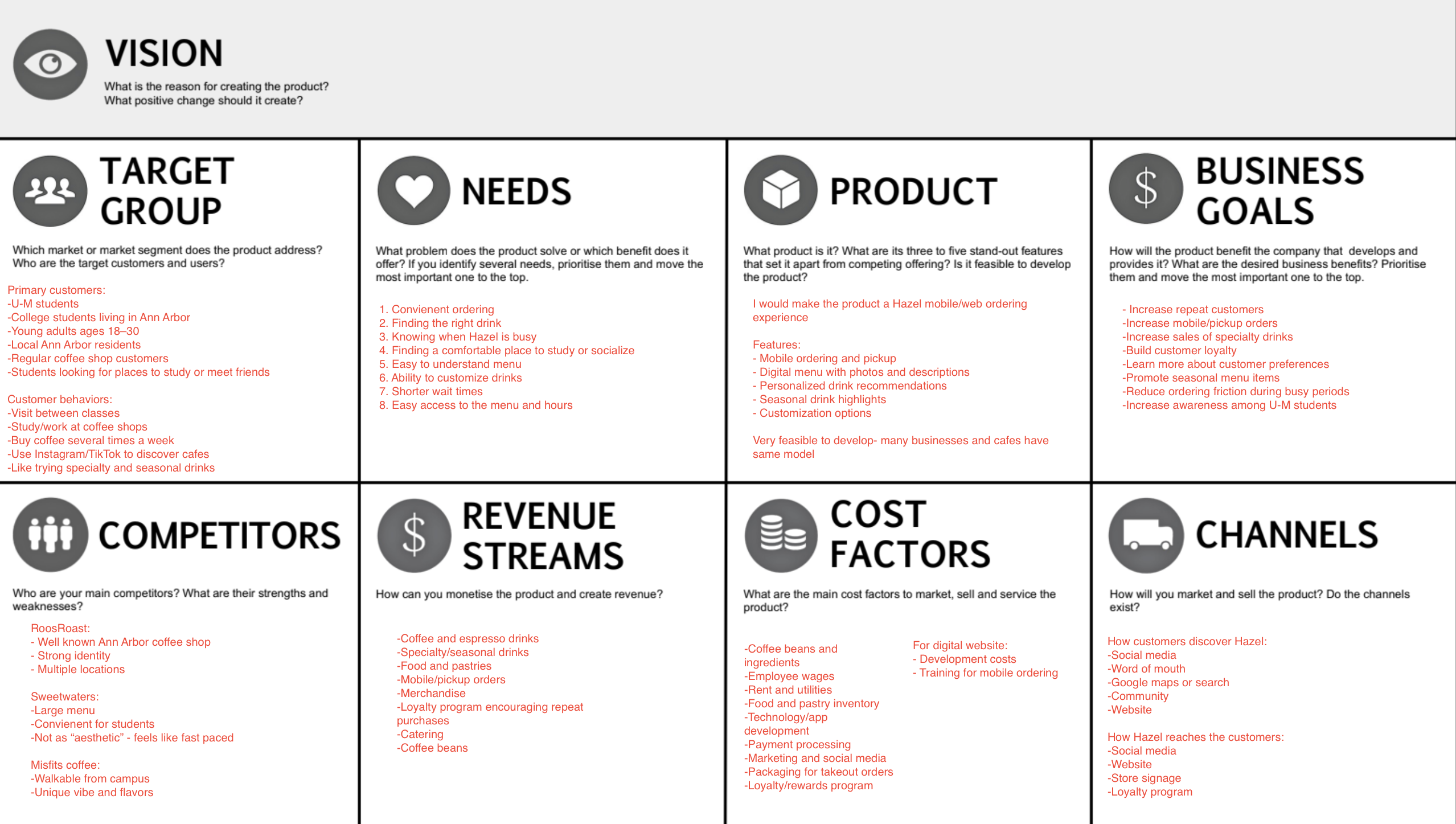
Before exploring design solutions, I identified the needs of both customers and Hazel Coffee Co. The existing website offered limited information, with no menu or online ordering feature. The redesign needed to make the experience more useful for customers while helping the business better showcase its offerings.
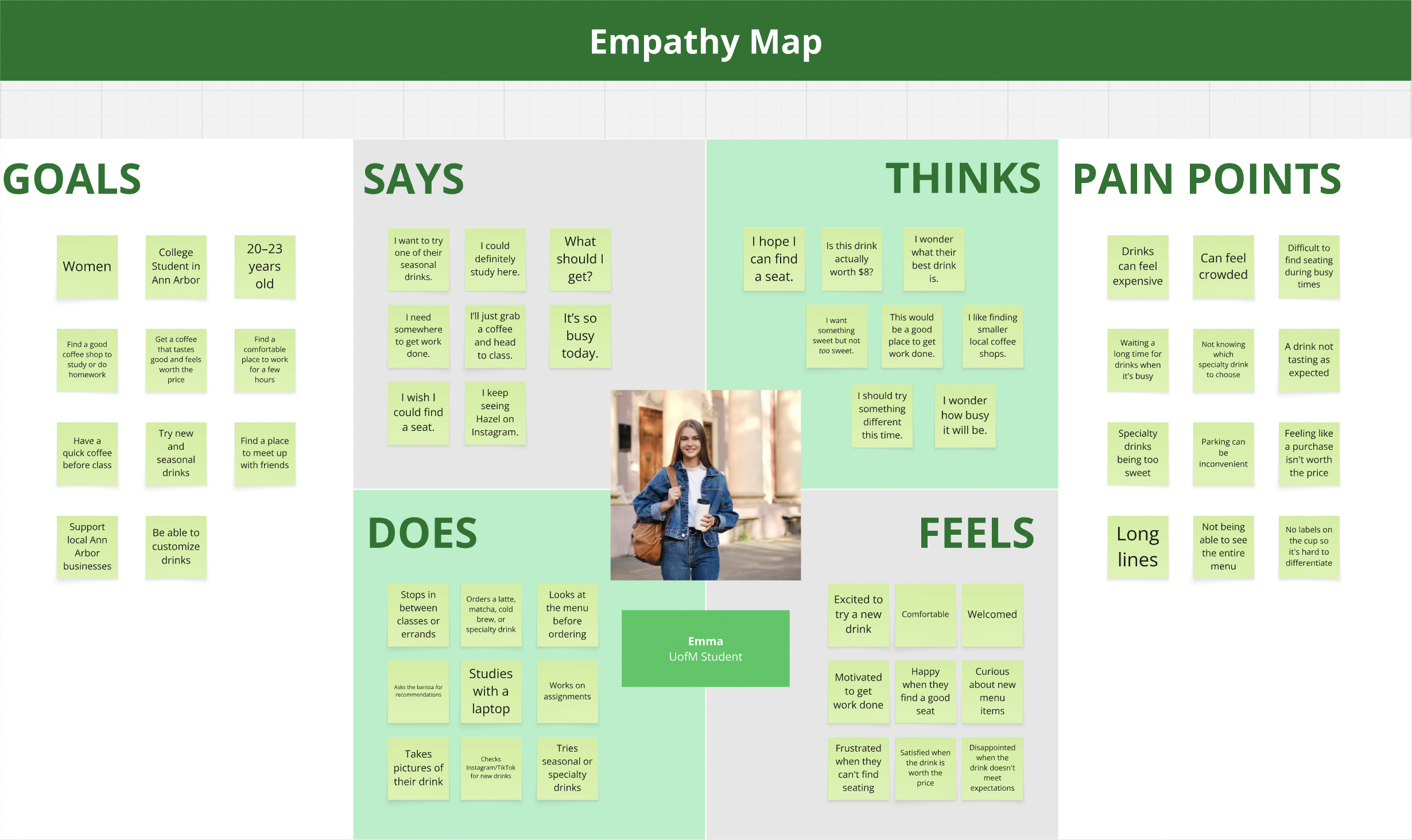
User Focused Deliverable: Empathy Map
Business Focused Deliverable: Product Vision Board

I chose the product listing page as my innovative concept because Hazel Coffee Co.’s existing website has no menu or online ordering feature. I sketched a page that organizes drinks into categories, including hot and iced coffee, matcha, seasonal drinks, and specialty drinks. This gives customers the option to browse the full menu or filter by category, making it easier to find what they want and order pickup before arriving at the cafe.


After establishing my typography and color styles, I created reusable components in Figma to keep the Hazel Coffee Co. website consistent across desktop and mobile. I created button components for both screen sizes, along with checkbox and input field components for form interactions and desktop and mobile header bars for navigation.
Using reusable components made it easier to update elements throughout the design and maintain a consistent experience across screen sizes.
I created separate desktop and mobile versions of the buttons and header bars to account for differences in screen size, layout, and interaction. This helped me adapt the interface for each device while keeping the overall visual style consistent.

Using my solution sketch, style guide, and reusable components, I created the initial designs for the Hazel Coffee Co. website. I focused on building a product listing page where customers could browse the menu by category, select drinks, and begin an online pickup order.
I developed the designs in Figma and connected the screens into a clickable prototype so users could interact with the ordering experience and complete key tasks.


I created a usability test in UserTesting.com to compare the existing Hazel Coffee Co. website with my redesigned Figma prototype. Since the live website did not offer online coffee ordering, I asked participants to try finding merchandise and reaching checkout on the existing site, then complete a task ordering a drip coffee with whole milk on my prototype.

Key findings:
1. The ordering flow was easy to understand
All three participants responded positively to the menu experience. Participants found the “Start an Order” button easy to locate, and the drip coffee was easy to find within the menu. Visible categories also helped users understand how the menu was organized.
2. The add-to-cart interaction was unclear
Two participants expected a clearer way to add drinks to their cart. One expected to click the menu item to view its details, while another felt the plus button was less clear than a labeled “Add to Cart” button.
3. Drink customizations needed clearer feedback
Two participants noticed that whole milk did not appear in the cart or order summary after they selected it. This made it difficult to confirm whether their customization had been saved.
4. The visual design made browsing more appealing
Participants responded positively to the clean design, product photography, visible prices, and organized menu categories. One participant specifically felt the prototype looked more polished than the existing website.

I grouped feedback from three participants into themes to identify recurring strengths and usability issues across the ordering experience.
After usability testing, I made a final round of updates to my desktop and mobile prototypes based on participant feedback. I focused on improving readability, making drink customizations easier to confirm, and making the ordering experience easier to use across screen sizes.
Explore the final desktop and mobile designs
Explore the final desktop prototype


As I finalized my desktop and mobile designs, I added annotations to document how interactive elements should behave and provide guidance for developers. These notes covered form validation, checkout button states, cart interactions, and order confirmation, along with accessibility considerations such as alt text and tooltips.
Key annotations included:
These annotations helped me document the intended interactions and accessibility considerations alongside the final designs, giving developers clearer guidance for implementation.
This project gave me the opportunity to take a website with limited information and no online coffee ordering feature and develop a prototype that supports the customer ordering experience.
My three biggest takeaways were:
One of my biggest takeaways was the importance of testing a design with users before considering it finished. Even when an interface looks clean and organized, small details like unclear buttons or missing order information can affect the user experience. This project helped me connect usability testing findings to specific design decisions and consider both the visual interface and the interactions behind it.